Laravel Sevdesk - Creating Invoices via API
Creating invoices in Sevdesk is quite simple. Creating invoices via the API, on the other hand, can be quite frustrating. I have therefore expanded my Laravel Sevdesk API package to create simplicity here. Feel free to check out my first blog about the package for the first steps.
Preparation
For an invoice to be created, we need the ID of a contact person. This must be a Sevdesk user that you can find under Settings > Users. Unfortunately, there’s no way in the Sevdesk portal to find out the user’s ID. That’s why I created a small Artisan command for this.
Use the following command:
php artisan sevdesk:userNote, however, that you must first insert your API key into the .env file. This command fetches all users and displays them in a list with the ID, name, and email.
Check Sevdesk API Key
Start user request
Found some users.
==========================================================
12345678 | Martin Appelmann | hello@martin-appelmann.de
==========================================================
Here you select your user and copy the ID. You also add this to the .env file. There are a few other optional configurations to edit details in your invoice. In the end, your .env should look something like this.
SEVDESK_API_TOKEN=secret_token
SEVDESK_SEV_USER=12345678
SEVDESK_TAX_RATE=19 (optional)
SEVDESK_TAX_TEXT="Umsatzsteuer 19%" (optional)
SEVDESK_TAX_TYPE=default (optional)
SEVDESK_CURRENCY=EUR (optional)
SEVDESK_INVOICE_TYPE=RE (optional)
Create Invoice
Now that the preparation is done, we can begin with the actual creation. First of all, we need our Sevdesk instance here. With the invoice and create method, a new Sevdesk invoice is created. The first parameter is the contact ID of the recipient and the second parameter is the invoice items that are passed in the form of an array. The third parameter is optional and can contain additional options that are responsible for the invoice. In the official documentation there’s an overview of all the options.
$sevdeskApi = SevdeskApi::make();
$sevdeskApi->invoice()->create($invoiceId, $items, $parameters);
The items are passed in the form of an array. Each element has at least a name and a price. Both are required for an item. Quantity and text are optional here and can also be omitted.
[
    [
        'name' => 'Web Design',
        'price' => 500,
    ],
    [
        'name' => 'Server Setup',
        'price' => 200,
        'quantity' => 2
    ],
    [
        'name' => 'App Development',
        'price' => 800,
        'text' => 'for iOS and Android'
    ]
]
This is what the complete code snippet looks like.
$sevdeskApi = SevdeskApi::make();

$items = [
    [
        'name' => 'Web Design',
        'price' => 500,
    ],
    [
        'name' => 'Server Setup',
        'price' => 200,
        'quantity' => 2
    ],
    [
        'name' => 'App Development',
        'price' => 800,
        'text' => 'for iOS and Android'
    ]
]

$sevdeskApi->invoice()->create(12345678, $items);
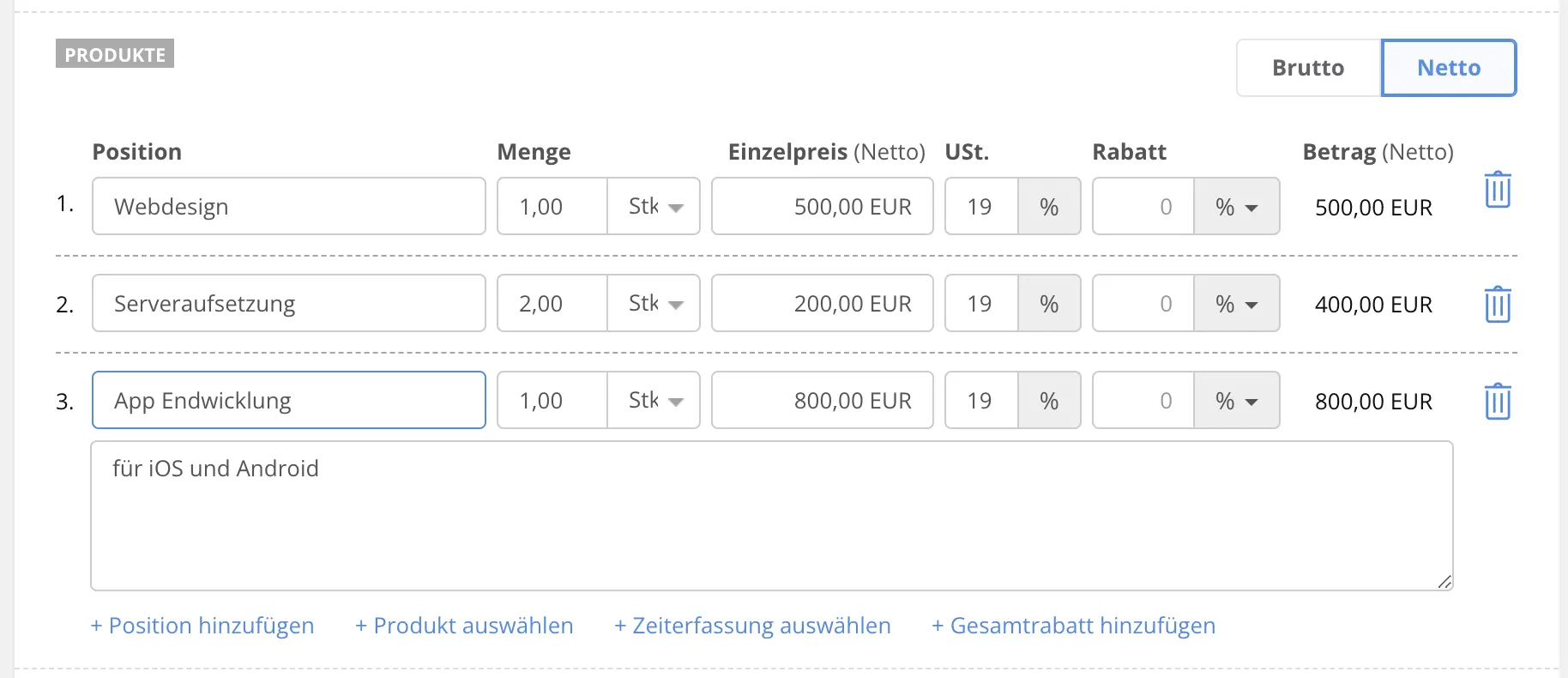
And this is the result in Sevdesk.
Summary
Invoice creation brings an important part to the Sevdesk package. Here and there are still a few possibilities for improvement, but for now, this is good.
If you find something that doesn’t fit or could be implemented better, please let me know in the comments.
Otherwise, I wish you a good week. See you next time.
Bye
Subscribe to Newsletter
Get updates on new blog posts, tutorials and tips about Flutter, Laravel and more.