Bloc vs Riverpod: Which State Management System Fits Your App
The development of apps with Flutter has gained popularity in recent years, as this framework enables efficient creation of cross-platform apps with a native feel. A crucial aspect in the development of such applications is state management, which handles the management of the app’s state. In this context, two solutions have particularly emerged: Flutter Bloc and Flutter Riverpod.
This article examines the differences, functionality, and also shows the differences in code to provide you with guidance in selecting the appropriate state management system.
What is Flutter Bloc?
Flutter Bloc is a popular state management package that is based on the principles of events and states. It was developed to promote a clear separation between business logic and the presentation layer. Through the Bloc pattern, developers can create reactive applications that efficiently respond to user input or other events by treating state changes as simple events.
How It Works
At the core of the Bloc pattern are three main components: Event, State, and the Bloc controller itself.
Events are actions triggered by the user interface that request a change in state. This can be, for example, a button that triggers a request to the backend server.
The State represents the part of the app state that the Bloc manages. For example, Loading status, Success status, and Error status.
The Bloc Controller processes incoming events, can change the status of the Bloc, which are then returned to the UI to trigger an appropriate response or update.
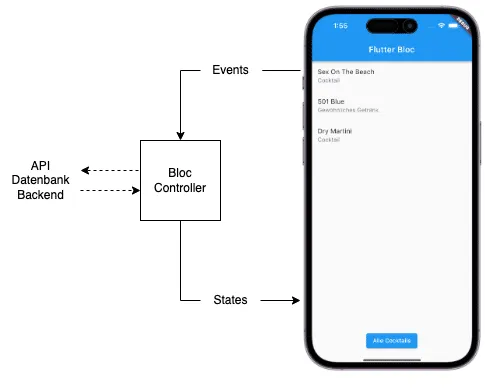
The figure above shows a typical workflow for a Bloc implementation. In the UI, an event is triggered, this event is processed in the Bloc controller and changes the UI status.
If you want to learn more about Bloc, check out my post about it or visit my YouTube channel.
What is Flutter Riverpod?
Flutter Riverpod is a newer and more flexible alternative to traditional state management solutions in Flutter that was quickly adopted by the community. It builds on the strengths of Provider while addressing some of the limitations that developers have experienced when using Provider and even Bloc.
How It Works
You probably know this figure from Andrea’s blog. The essential difference between Provider and Riverpod is that Riverpod makes all providers available to the entire widget tree.
So the entire app has access to all providers. This means the error that the provider was not found cannot occur.
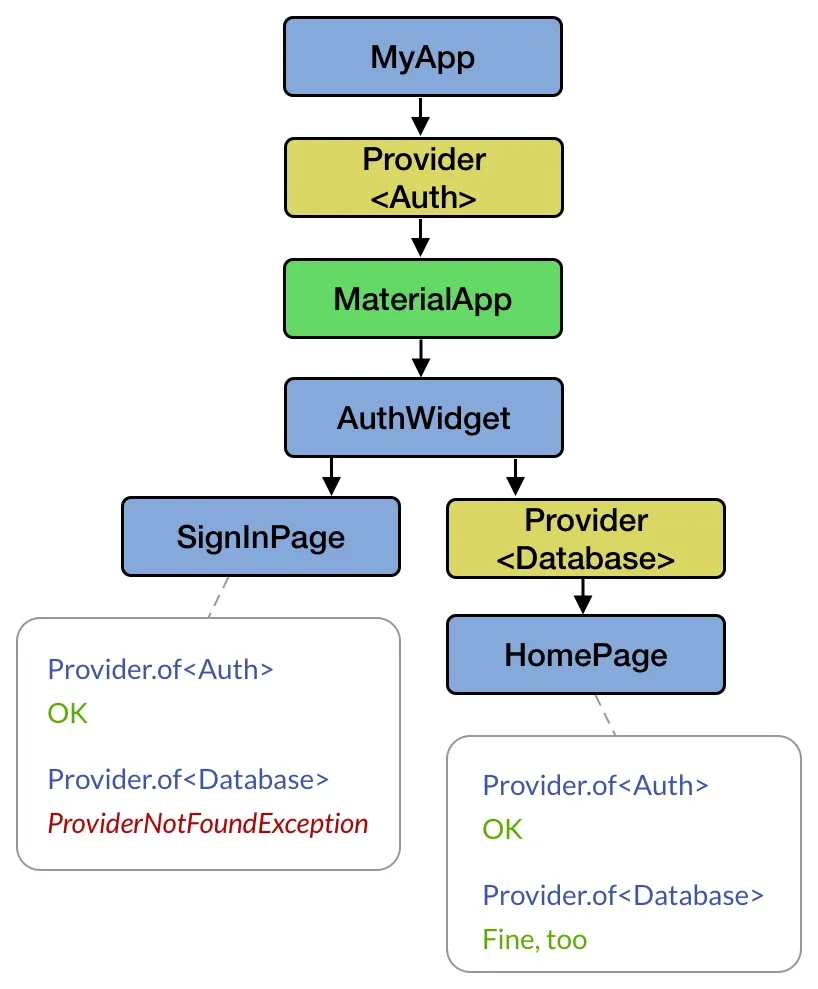
Essentially, there’s a distinction between the read provider, which can only read and provide data, and the write provider, which can also contain mutable data.
In my blog post, which was actually supposed to become a small Riverpod tutorial, I complained a bit about Riverpod, but I’ve engaged with it a bit more and must say that my opinion of Riverpod has improved somewhat. Especially because through the new annotations you don’t have to write as much boilerplate code. Nevertheless, I usually still prefer Flutter Bloc.
Comparison of Core Concepts
With Riverpod, all providers are available to you simultaneously. This means that in every small widget you implement, you could theoretically change all states. Whether this is an advantage or a disadvantage is kind of a matter of interpretation. For me, it’s a disadvantage because I’m a fan of only making data available when I really need it.
In contrast, Bloc is only used when it’s also initialized. This means if the Bloc isn’t needed, it won’t be created either. For me, the core concept of Bloc outweighs this.
Comparison of Learning Curve
Flutter Bloc kept me busy for a few weeks back then until I completely understood it. But once you’ve understood the principle, you shouldn’t have any problems writing larger and more complex Blocs.
I also had to invest quite a bit of time with Riverpod to understand it. But compared to Bloc, it was a bit more. I also had more problems understanding how Riverpod works. I admit that to this day I haven’t understood all facets of Riverpod.
Comparison in Code
As an example, I’ve implemented part of my weather app in Bloc and Riverpod. The example starts a query to the server to display the current weather data. There’s a loading screen during the query and an error display if something goes wrong.
Example with Riverpod
The simplified representation only shows the widget and the associated provider. The complete data layer is missing here, which you get through the weatherRepositoryProvider.
weather_overview_screen.dart
class WeatherOverviewScreen extends ConsumerStatefulWidget {
  const WeatherOverviewScreen({super.key});

  @override
  ConsumerState createState() => _WeatherOverviewScreenState();
}

class _WeatherOverviewScreenState extends ConsumerState {
  @override
  Widget build(BuildContext context) {
    return Center(
      child: ref.watch(weatherFutureProvider).when(
        loading: () {
          return const CircularProgressIndicator();
        },
        error: (error, stack) {
          return Text(error.toString());
        },
        data: (weather) {
          return Text(weather.temperature.toString());
        },
      ),
    );
  }
}
weather_future_provider.dart
final weatherFutureProvider = FutureProvider.autoDispose((ref) {
  // get repository from the provider below
  final weatherRepository = ref.watch(weatherRepositoryProvider);
  // call method that returns a Future
  return weatherRepository.getForecast(
    language: 'de',
    latitude: 50,
    longitude: 10,
  );
});
weather_repository.dart
@riverpod
WeatherRepository weatherRepository(WeatherRepositoryRef ref) =>
    WeatherRepository(
      apiHandler: ref.watch(apiHandlerProvider),
    );

class WeatherRepository {
  WeatherRepository({
    required ApiHandler apiHandler,
  }) : _apiHandler = apiHandler;

  final ApiHandler _apiHandler;

  Future<Weather> getForecast({
    required double latitude,
    required double longitude,
    required String language,
  }) async {
    final response = await _apiHandler.get(
      ApiRoutes.weather,
      queryParameters: {
        'latitude': latitude,
        'longitude': longitude,
        'language': language,
      },
    );
    return Future.value(Weather.fromJson(response.data.first));
  }
}
Example with Bloc
Here too, there’s only the simplified version. What you can already see at first glance is that the Bloc code has quite a few more lines.
weather_overview_screen.dart
class WeatherOverviewScreen extends StatefulWidget {
  const WeatherOverviewScreen({super.key});

  @override
  State createState() => _WeatherOverviewScreenState();
}

class _WeatherOverviewScreenState extends State {
  late WeatherOverviewBloc bloc;

  @override
  void initState() {
    bloc = WeatherOverviewBloc(
      weatherRepository: RepositoryProvider.of<WeatherRepository>(context),
    );
    bloc.add(const WeatherOverviewFetchedWeatheredEvent());
    super.initState();
  }

  @override
  Widget build(BuildContext context) {
    return BlocConsumer<WeatherOverviewBloc, WeatherOverviewState>(
      bloc: bloc,
      listener: (context, state) {
        if (state is WeatherOverviewFetchedWeatherFailure) {
          ScaffoldMessenger.of(context).showSnackBar(
            SnackBar(
              content: Text(state.error),
            ),
          );
        }
      },
      builder: (context, state) {
        if (state is WeatherOverviewFetchedWeatherInProgress) {
          return const Center(
            child: CircularProgressIndicator(),
          );
        }
        if (state is WeatherOverviewFetchedWeatherSuccess) {
          return Text(state.weather.temperature.toString());
        }
        return const SizedBox.shrink();
      },
    );
  }
}
weather_overview_bloc.dart
class WeatherOverviewBloc
    extends Bloc<WeatherOverviewEvent, WeatherOverviewState> {
  WeatherOverviewBloc({
    required WeatherRepository weatherRepository,
  })  : _weatherRepository = weatherRepository,
        super(WeatherOverviewInitial()) {
    on<WeatherOverviewFetchedWeatheredEvent>(
      _onWeatherOverviewFetchedWeatheredEvent,
    );
  }

  final WeatherRepository _weatherRepository;

  Future<void> _onWeatherOverviewFetchedWeatheredEvent(
    WeatherOverviewFetchedWeatheredEvent event,
    Emitter<WeatherOverviewState> emit,
  ) async {
    try {
      emit(WeatherOverviewFetchedWeatherInProgress());
      final weather = await _weatherRepository.getForecast(
        language: 'de',
        latitude: 50,
        longitude: 10,
      );
      emit(WeatherOverviewFetchedWeatherSuccess(weather: weather));
    } catch (error) {
      emit(WeatherOverviewFetchedWeatherFailure(error: error.toString()));
    }
  }
}
weather_repository.dart
class WeatherRepository {
  WeatherRepository({
    required this.weatherProvider,
  });

  final WeatherProvider weatherProvider;

  Future<Weather> getForecast({
    required double latitude,
    required double longitude,
    required String language,
  }) async {
    return weatherProvider.getForecastWeather(
      latitude: latitude,
      longitude: longitude,
      language: language,
    );
  }
}
Conclusion: Bloc vs Riverpod
Both are very popular state management systems and have a large fan base. Sometimes it feels like the eternal battle between Windows and Apple.
If you want to write less code and want access to all data at any time, then Riverpod is a good choice. However, if you only want to equip the area of your code with state management that currently needs it, and have no problem with a bit more code, then Flutter Bloc is a good choice.
Generally, you can’t go wrong with either. It would be even better if you tried both systems to also be prepared for both with your customers or in your job.
Subscribe to Newsletter
Get updates on new blog posts, tutorials and tips about Flutter, Laravel and more.